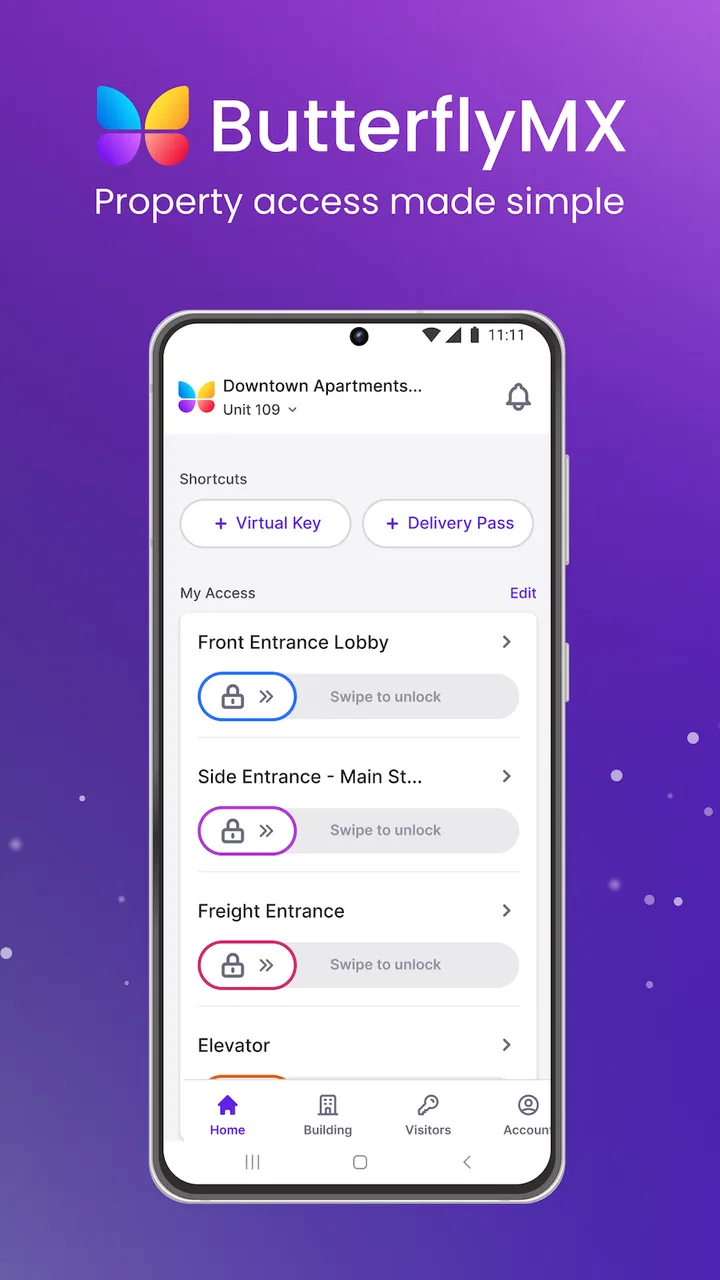
ButterflyMX
- 4.8
- Rating
- 500.00K
- Installs
- Free
- Price

 Analysis by App-foxy
When I first look at a building-access app, I do not begin with the download button. I ask a more practical question: will it make arriving, letting someone in, and keeping track of access easier than the method I already use? ButterflyMX is built around that everyday problem. It is a free productivity app from ButterflyMX, Inc, and its purpose is to put access tasks within reach of the phone rather than leaving everything to a physical key, a call to a concierge, or a separate building system.
That focus makes it different from a general smart-home app or a broad productivity tool. It is not trying to organize my calendar, manage notes, or replace every household service. Its value depends on whether my building or property already uses the ButterflyMX access system. If it does, the app can become a useful daily control point. If it does not, installing it alone will not turn an ordinary entrance into a connected one. That distinction is the first thing I would want a friend to understand before spending time setting it up.
How I Decided Whether ButterflyMX Was Worth Using
I judged it by four simple criteria: how quickly I could handle a normal arrival, how much effort it took to give access to another person, whether the app reduced dependence on physical access methods, and how well it fitted a shared building rather than just one private door. Those criteria matter because access software is only helpful when it removes friction at the exact moment I need it.
You May Also Like

 Blood Strike: 2.5 Anniversary
Blood Strike’s Loadouts Turn Every Drop Into a Tactical Gamble
A close look at Blood Strike’s custom loadouts: how fast access to signature weapons reshapes its battle royale rhythm, rewards preparation, and narrows the gap between fights.

 Pandora - Music & Podcasts
Pandora’s Music Is Easy to Start, but Harder to Recover
Pandora’s strength is its low-effort path from a seed to a station. Its weak spot is how much confidence it asks you to place in connection, setup, and quiet recovery.

 8 Ball Pool
 Is Built on Rivalries, Rematches, and Routine
A close look at the rivalries, rematches, shared routines, and unanswered safety questions that turn a quick pool match into a persistent mobile community.

 Samsung Music
’s Quiet Strength Is Playing What You Already Own
Its reach comes less from spectacle than from dependable access to a personal library. That simplicity is both the app’s strongest retention engine and its ceiling.

 AccuWeather: Weather Radar
AccuWeather Review: A Quick, Clear Forecast for Everyday Decisions
For everyday plans, the best forecast is the one you can understand quickly. AccuWeather makes rain timing, radar, and local conditions easy to act on, with a few trade-offs.

 Hill Climb Racing
Why Hill Climb Racing Still Turns Crashes Into One More Run
A tiny car, a bumpy hill and one more upgrade: Hill Climb Racing keeps resurfacing because its simple chaos makes every near-miss feel personal.
More From Our News Desk
View All News


The app has been available since September 25, 2013, which gives it a longer presence than a brand-new building-access experiment. Its current version is 1.59.0, and the store shows an average rating of 4.8 from around 16 thousand ratings, with about 1.1 thousand written reviews. I see those figures as useful context rather than a guarantee. A good rating suggests that many people find the service dependable enough for regular use, but my own experience with any access app would still depend heavily on the installation and setup chosen by the property.
The biggest decision point is therefore not whether the interface looks appealing in isolation. It is whether the building manager, landlord, office, or community has deployed compatible ButterflyMX equipment and enabled the relevant resident or user account. For someone moving into a property that already uses it, the app deserves serious consideration. For someone searching for a standalone replacement for a key or intercom, it is the wrong starting point.
What everyday access feels like
The most convincing use case is a routine one. Imagine I am carrying groceries, my phone is already in my hand, and I reach the entrance without wanting to search through a bag for a key or wait for another resident to open the door. An access app can be valuable in that moment because it keeps the action close to something I already carry. The benefit is not excitement; it is the removal of a small interruption that happens repeatedly.
The same logic applies when a visitor arrives while I am upstairs or away from the entrance. Instead of treating access as a purely physical exchange, the app gives the building’s access workflow a mobile layer. That can be more convenient for residents who receive deliveries, family members, cleaners, caregivers, or repair workers. I would still use judgment about whom I allow in, but the decision can happen without physically walking to the entrance.
A less obvious advantage is the change in planning. With a traditional intercom or key-only arrangement, I often have to coordinate access around being present at the right place. A phone-based system can make that coordination less rigid. This is especially helpful in a shared building where different people need temporary or occasional entry, although the exact options available to me would depend on how the property has configured its system.
Where it is strongest
ButterflyMX makes the most sense when access is a shared responsibility. In an apartment building, condominium, office, or similar property, the entrance is not managed by one person alone. Residents, visitors, staff, and delivery workers may all interact with it, so a system that connects the resident’s phone to the property’s access equipment can reduce the number of separate conversations and physical handoffs.
I also like the fact that the app sits in the productivity category rather than presenting itself as entertainment or a lifestyle distraction. That sounds minor, but it reflects the right expectation: I open it to complete a task. The best access app is one I can understand quickly, use when I am busy, and close again. ButterflyMX’s appeal is strongest when it stays in that practical lane.
Another strength is the potential to simplify life for people who regularly manage access for others. A resident who has a support worker visit, a family member who needs occasional entry, or a household that receives frequent deliveries may gain more from the app than someone who rarely has visitors. The more often access has to be coordinated, the more valuable a centralized mobile workflow becomes.
There is also a useful psychological benefit: I do not have to treat every access event as an emergency interruption. If the system is already set up and the phone is available, letting someone through can become a small, deliberate action instead of a scramble for keys or a dash to the intercom. That will not matter equally to everyone, but it is the kind of repeated convenience that can justify keeping an app installed.
Practical habits that make the experience better
My first tip is to complete setup before the first urgent visitor arrives. Access apps are poor tools to test for the first time while a courier is waiting outside. I would sign in, check that the correct property or entrance appears, and learn the main action while I am at home and unhurried. This is not glamorous advice, but it prevents a simple access task from becoming a support call.
My second tip is to treat phone readiness as part of the access plan. A mobile access workflow is convenient precisely because it uses the phone, so a dead battery, a locked-out account, or an unreliable connection can become more noticeable than with a metal key. I would keep a backup method available where the property provides one and avoid assuming that the app should be my only way inside.
A third useful habit is to separate regular access from exceptional access. If I am inviting someone who visits often, I would use the property’s intended recurring workflow if one is available rather than improvising every time. For a one-off visitor, I would keep the interaction short and verify the person before granting entry. The app may make access easier, but it does not remove the need for sensible household security.
I would also avoid granting access while distracted. The convenience of a phone button can make an important decision feel casual. Before allowing entry, I would check who is expected, why they are there, and whether the timing makes sense. This is a small but important trade-off: the smoother the action becomes, the more deliberate I should be about the decision behind it.
Where the usual alternatives may fit better
The closest alternative is often not another app. It may be a physical key, a fob, a traditional intercom, a staffed reception desk, or a property’s existing access card. Those methods can be better for someone who wants an independent backup that does not rely on a phone. They can also feel simpler for residents who enter through the same door every day and rarely need to manage visitors remotely.
A general smart-home platform may be a better fit for a homeowner who wants one place for lights, cameras, locks, heating, and other devices. ButterflyMX is more focused on building access, so I would not choose it merely because I want a broad home-automation dashboard. Its specialization is an advantage when the building supports it, but it is not a substitute for every connected-home need.
Property-specific resident portals may also suit people who want access, maintenance requests, announcements, payments, and community communication in one application. If those broader tasks are central to daily life, a larger resident-management platform could feel more complete. ButterflyMX is more attractive when the immediate problem is entering the building and coordinating visitors, not managing every administrative detail of a tenancy.
For a small private home, a standalone smart lock or video doorbell may be more appropriate. Those products are designed around an owner-controlled door, while ButterflyMX is most naturally evaluated as part of a managed access environment. Choosing between them is less about which app has the nicer screen and more about who owns the entrance, who maintains the hardware, and how many people need access.
Limitations I would consider before switching
The first limitation is dependence on the surrounding system. I cannot get the full value from ButterflyMX simply by downloading it. The property must support the service, and the account must be connected to the appropriate access setup. That makes the app less flexible than a key or a personally purchased lock. It also means that a resident may have little control over the experience if the building’s equipment, onboarding, or policies are confusing.
The second limitation is that mobile convenience introduces mobile failure points. A phone can be misplaced, unavailable, out of power, or affected by a sign-in problem at exactly the wrong time. I would not describe that as a reason to reject the app, but I would treat it as a reason to maintain a realistic backup plan. The best experience is not “phone access at all costs”; it is phone access combined with sensible preparation.
There is also a learning curve for people who are uncomfortable with app-based entry. A resident may understand a key immediately but hesitate when access depends on an account, a screen, and a property-specific setup. In a building with older residents, frequent guests, or many different user types, the quality of instructions and support can matter as much as the app itself. The software cannot fully solve a confusing building process.
Another trade-off is concentration of responsibility. When visitor access becomes easy, residents may use it more frequently and think less carefully about each request. I would prefer a system that encourages convenience without encouraging automatic approval. ButterflyMX can support a faster workflow, but good judgment still belongs to the person holding the phone.
Who should use it, and who should skip it
I would recommend trying it to anyone whose building already uses ButterflyMX and who regularly deals with visitors, deliveries, shared entrances, or the inconvenience of carrying physical access items. It is particularly suitable for residents who want to handle entry from a phone and for households where access needs change throughout the day.
I would be more cautious for someone who rarely uses a smartphone, dislikes account-based services, or wants a completely independent access method. That person may be happier with a key, fob, or staffed entry arrangement, especially if the app would be used only occasionally. I would also skip it as a purchase decision if the property does not support the system; in that situation, another access solution designed for the actual door would be more sensible.
For families, I would discuss the workflow before relying on it. Who is allowed to approve visitors? What happens when one person is away? Which backup method will everyone use if a phone is unavailable? These questions are more useful than simply asking whether the app is easy to download. The app can improve coordination, but only when the household agrees on how access should be handled.
The cost of changing the way I enter
The app itself is free, which lowers the barrier for a resident who already has access to the compatible building system. The real cost of switching is behavioral rather than financial. I have to remember a new process, keep my account usable, explain it to visitors, and decide what backup method remains available. For a person who enters once or twice a day and never receives guests, that change may not feel worthwhile.
For a busy resident, the calculation can look different. If the app prevents repeated trips to the entrance, reduces coordination calls, or makes deliveries easier to manage, the small amount of setup may pay off quickly in saved effort. I would judge it over a normal week rather than after one test entry. The value comes from repeated access moments, not from the novelty of opening the app once.
Switching also has a social cost in shared properties. Visitors may need clear instructions, and some may still expect a conventional buzzer or key. I would send simple arrival guidance and avoid assuming that everyone understands mobile access immediately. A short explanation can prevent confusion at the entrance and makes the system feel like a convenience rather than a barrier.
Because the product is rated for Everyone, it is positioned for broad everyday use rather than a narrowly restricted audience. Even so, I would match the setup to the person using it. A child, an older relative, a temporary guest, and a property manager may all need different levels of explanation and responsibility. The age rating does not replace that practical judgment.
My recommendation after using it as an access tool
ButterflyMX is a focused solution, and that is exactly why I would recommend it selectively. It is not a universal smart-home replacement, and it is not useful as a standalone download when the building has no compatible access arrangement. But when the property already supports it, the app can turn common access tasks into manageable phone actions and make visitor coordination less dependent on being physically near the entrance.
The service has grown into a recognizable option, with over 500 thousand installs, and the strong average rating indicates that it has found a receptive audience. I would still place more weight on the quality of the building’s setup than on popularity alone. A well-explained installation with dependable support will make the experience feel much better than an identical app introduced without clear instructions.
My final advice is simple: install it if your property uses ButterflyMX, prepare it before you need it, keep a backup entry method, and use visitor access thoughtfully. If your main goal is broad home automation, a general smart-home platform may suit you better. If your goal is faster, more flexible building access, this app is worth a serious try. In that specific situation, it earns its place on my phone because it addresses a repeated real-world task without pretending to be something larger than it is.
FAQs for ButterflyMX
01What is ButterflyMX and how does it work?
ButterflyMX is a smart intercom system designed for modern buildings. It allows users to manage property access through a smartphone app. Residents can see and speak with visitors via video call, and grant access remotely. The system integrates seamlessly with existing building infrastructure, providing secure, convenient entry management.
02Is ButterflyMX compatible with all types of buildings?
ButterflyMX is primarily designed for multi-tenant residential buildings, commercial spaces, and gated communities. It’s suitable for buildings with existing intercom systems that need a modern upgrade. However, it may not be ideal for single-family homes or buildings without a centralized entry point. Compatibility may also depend on specific building layouts.
03How secure is the ButterflyMX system?
Security is a top priority for ButterflyMX. It employs end-to-end encryption for all communications, ensuring data privacy and security. The system logs all access events, allowing property managers to track entries. Additionally, it supports two-factor authentication for enhanced security, making unauthorized access significantly more difficult.
04What are the key features of the ButterflyMX app?
The ButterflyMX app offers a range of features including video intercom, remote door unlocking, delivery management, and visitor tracking. Users receive notifications when someone is at the door and can communicate directly with visitors. The app also integrates with other smart home devices, expanding its functionality within smart buildings.
05How easy is it to install ButterflyMX?
Installation of ButterflyMX is straightforward, often requiring minimal changes to existing infrastructure. The system is designed for easy integration, usually completed by a professional installer. Once installed, the app setup is user-friendly, guiding residents through account creation and configuration with intuitive prompts and support.
Pros
- User-friendly interface simplifies access.
- Video calling enhances security.
- Integrates with smart home devices.
- Remote access for added convenience.
- Customizable access permissions.
Cons
- Requires stable internet connection.
- Limited functionality without subscription.
- Some features can be complex to set up.
- Relies heavily on device compatibility.
- Notifications can be inconsistent.

ButterflyMX
Gallery